Independent Projects
The Midnight Cathedral Songbook
Building a custom markup system and browser-based songbook app to learn and perform an original gothic metal rock opera
I love a new music project. Nothing lights me up inside like an idea that either comes to me for a song at 6am (when most of my lyric and song ideas happen) or is presented to me by a potential collaborator. When something like that hits me in the right way, I will obsess over it and attack the goal or the process with a vigor that I don’t normally throw at other things. Quite often, others will remark at either the speed or the thoroughness with which I respond and deliver a response. My drive to achieve a goal will keep me from sleep, from meals, from anything that takes me out of my studio until that goal is met and the beast is defeated.
My presence on Bandmix has been particularly fruitful over the years in bringing me lots of opportunities to join bands or collaborate musically in other ways. Usually, my plate is already full of projects, and I end up either saying thanks but no thanks to people, or I may entertain the idea for a brief period before realizing I just don’t have the time or the inspiration to pursue the opportunity, and I turn it down. I do enjoy collaborating, though. Musical collaboration is a great joy in my life and has been the engine behind many of my best music projects over the years. I also enjoy coming into a situation where the engine is already running, but my particular octane of gasoline is needed to make it run better, faster, or get the project to where it needs to go.
Recently, via Bandmix, I was contacted by Paul Faust of Midnight Cathedral, a creative collective project focused on original theatrical gothic metal rock opera storytelling. As often happens, band members come and go, and people are often in need of this or that position to be filled. Such was the case with Midnight Cathedral. Their keyboardist had recently left, and they were looking for a replacement. While not initially my cup of tea musically, the music really grew on me, even in its demo form, which I listened to on their Bandmix profile. After some communication back and forth, I went to visit one of their rehearsals, and then after some more time in consideration, I decided I would say yes to this project.
One unique aspect of this project was that they had an entire show of original songs already written which told a story. It wasn’t just a band playing covers or as a tribute. It was an imaginative creative endeavor being built from the ground up. Most of the creative conceptualization of the show had already been done – the sets, the costumes, the story, the lighting, the potential venues, and even the merchandising. What they needed was musicians who could learn and perform the material. So that became my project: learn an hour of original material well enough to perform with them.
Midnight Cathedral is an original theatrical gothic metal project combining music, storytelling, and stage presentation. Explore the project at the official Midnight Cathedral website.
The Act of Creation Becomes the Teacher
I was given a notebook containing the previous keyboardist’s printed notes about the songs. I looked it over. It was only partially complete, and its details were inconsistent from song to song, so it was nowhere near a ready-made manual for how to fill the keyboardist role in this band. That incomplete notebook gave me an idea and solidified what I knew I needed to do to work on the songs and learn them for myself: I needed to create my own songbook, built from scratch, and the creation of it would be the method by which I would learn the material.
That’s how I usually work when I need to tackle a project: build something completely customized for the way I like to work. It’s been that way since 1984, when I created my own songbook for my first-ever gig, playing interstitial music for my middle school’s talent show, and used it as my bible for knowing what settings to use for each song I played on my Lowrey Micro Genie keyboard. To my thinking, the best way to learn something is to create something dedicated to it, and the act of creation becomes the teacher.
I had been given all the recordings, so I had all the songs to listen to. On one of my solo road trips, I listened to the entire show multiple times, learning to distinguish between the songs, listening for the keyboard parts, and envisioning what I would need to see in front of me to play the songs.
I can somewhat read music, having taken piano lessons for many years as a child, but I don’t like to, and I haven’t had to do it in decades, so I’m somewhat out of practice. But I would never choose to read sheet music anyway. No way. That would seem too much like sheer drudgery and work, and I’m not good at it anyway. I have always played by ear, and my preferred way to read a song is to have the lyrics with the chords above them on a page. In my praise band days, we called them “lead sheets”, and over the years of playing at church and elsewhere, I grew accustomed to following lead sheets to play along with songs. These were all Word documents, and the chords would be placed directly above the words – or even the exact syllables – on which the chord changes would occur. There would also be headings denoting verses, choruses, bridges, and other musical notes regarding the arrangements. This system became very familiar to me over the 15 or so years that I played contemporary worship music, and even at my later secular gigs when I needed to play cover tunes I wasn’t familiar enough with to play by heart.
Designing a Markup Language for Songs
As I drove on that road trip, I also thought of the other necessary component of this project: how I would actually create what I needed. As has been the case dozens of times this year, my thoughts immediately turned to Kiro, and my newfound fondness for AI-assisted development. I knew I needed to create my songbook from scratch, but I also kept thinking of other things I knew I would want: primarily, a consistent markup scheme for how to create the song sheets. This was the original use I had for Kiro – to create a standard set of styles so that each song would look the same. I knew if I was going to be using this in rehearsal and/or on stage, I would want a consistent look. But that was just the beginning of what I eventually built.
As it turned out, I had a six-hour span of time on that road trip where I had nothing do to, so in my hotel room that day, I went through every song, and in Kiro, I went about the process of building a simple markup language I could use across all the songs. I had most of the lyrics (some of which I ended up typing myself from listening to the recordings – another good way to really become familiar with songs), so I started with a collection of lyric sheet documents – one for each song. I worked with Kiro to devise a system that started with the documents, migrated to text files, generated HTML files, with the ability to export PDFs. Nothing ground-breaking so far, but here’s the main thing I wanted to build: I wanted to be able to style and briefly mark how everything looked so that with a few characters in the markup, Kiro would know how to style, position, color and treat the raw text. During that six-hour period, I typed out all the songs, and began the process of marking up the text files the way I wanted to see them.
The process became a pipeline rather than a collection of separately maintained documents: the original Word lyric sheets were extracted into plain-text files, I annotated those files with my markup, and scripts built the resulting HTML pages and other outputs from that source. In practical terms, I write each song’s content once, then regenerate the materials from it. That means a correction to a chord, lyric, cue, or section marker can carry through to the different versions without my having to make the same edit in several places.
Kiro is a great tool for codifying and systematizing a process in ways I wouldn’t normally think of. Each markup file, generated from the original lyric sheets, contains a whole section at the top that is ignored by the exporting process, but which is useful documentation for me as I built out the songs. These headers, written on lines starting with “#”, denoting that they contain header information only, give complete instructions for how to label each song for whatever I need (arrangement notes, section markers, musical cues, synth notes, chord indicators, etc.). One feature of the songs in the Midnight Cathedral show is they contain lots of stops – places where the music stops for a lyric to be sung. If the musicians don’t know where the stops are, the song falls apart, so I knew I needed to mark all those important stops very carefully. As I worked through all the songs, I would encounter more and more types of labelling I would need, and Kiro would help me arrive at good shorthand for how to “code” those labels, and then it would add those steps to the header instructions on each page.
One key thing I wanted to be able to do was position the chords above the exact lyrics on which they fell, just like those old lead sheets I used to read. This is accomplished by putting the chords in brackets directly within the lines of the lyrics themselves. When Kiro renders the actual pages I’ll be looking at while playing, those bracketed chord names actually appear above the lyrics where they’re placed, in bold, and easily followed and read for performance.
Here’s a simple example of what that shorthand looks like in practice:
VERSE 1

[Am]Through rain-slick streets, I [F]watch her move, The [C]hunt for the [Gm]queen has be[Am]gun,
The bracketed chord markers tell the software where each chord belongs relative to the lyrics. For example, be[Am]gun places the Am chord over the final syllable. The beauty of this approach is that I can work directly in plain text, using a handful of simple characters to communicate exactly how the finished song sheet should look. The software interprets those markers and positions the chords above the corresponding lyrics automatically.
I knew what I needed to see, and Kiro helped me create it systematically so that all the treatments would be standardized and identical across all the songs. If I’d been simply creating Word documents, I might’ve formatted things inconsistently by mistake, and I might have to go back through and fix the design of things manually. This way, I can change what the shorthand markup does once, and that change ripples across all the songs.
The header instructions became a small, song-specific reference manual as well as a set of rules for the renderer. For example, a chord placed in brackets immediately before a syllable tells the system exactly where that chord belongs: be[Am]gun places Am over “gun,” while [Am]begun places it over the whole word. A line such as | D | D | Bb | Gm | represents chord measures in an instrumental passage. Other conventions distinguish printed performance directions from private comments: >> pipe organ enters creates a cue on the page, while lines beginning with # are ignored in the finished song sheet.
The marked-up song sheets would immediately be translated into HTML and CSS by the scripts I developed with Kiro, based on my labelling shorthand. The HTML versions incorporated colors I decided upon. I tend to like “dark mode” for applications, so the pages are black with white text. Lyrics are in italics. Chords are bold and yellow. Section markers (verse, chorus, etc.) are in purple. Measure markers are green, as are the musical notes (“keys out”, “half time groove”, “full strings”, etc.). I play two keyboards, and one important set of labels involves denoting which keyboard plays which parts. I have a Korg Nautilus and a Korg Triton for this show, and for these HTML pages, the Nautilus notes are blue, and the Triton notes are pink. Each of the keyboard notes are styled in a distinctive way, with a vertical line, a music note, and the keyboard name spelled out in a rectangle – all of which is denoted by “>> [N]” or “>> [T]” in my markup. I loved building this personalized “language” that told the software exactly how to style the HTML to show me the songs exactly how I wanted to see them.
The markup also lets me distinguish between directions that belong to the performance and notes that are only there to help me prepare. A whole-band stop can be marked with !!, with optional text such as !! HOLD 2 BEATS; an inline marker such as ((STOP)) can call attention to a hit at a specific point in a lyric. These details matter because a missed stop or misplaced chord is not merely a formatting problem—it can affect how the band performs the arrangement. The goal was to make the notation consistent enough that I could concentrate on the music instead of deciphering the page.
Building the Songbook App
By the time I had worked my way through the entire show, I had every song labelled and ready to create a songbook for actual use. I knew I might need to print out PDFs of the songs and create a physical notebook like the one the previous keyboardist had started to create, but I also knew that having something electronic would give me a lot more capabilities. Over the years, I had tried various types of electronic song sheet display solutions, none of which I was very happy with using. I could just open a PDF on a laptop, but moving between separate PDFs is a clunky process, and combining them all into one huge PDF was not only a lot of work, but also, what if the setlist changed (as it frequently did)? Then my songs wouldn’t be in the correct order, so I knew that solution wasn’t the best.
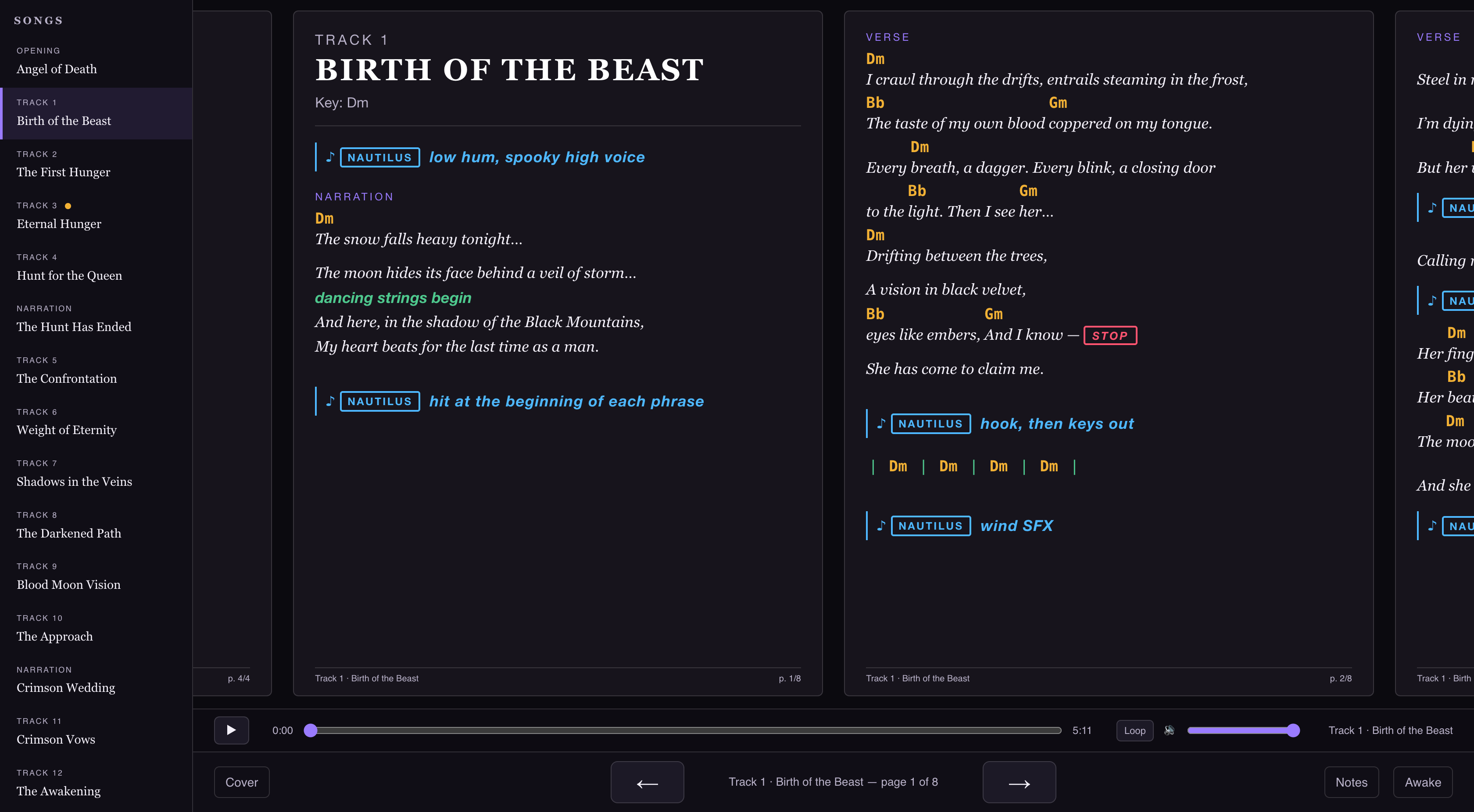
With Kiro, however, I realized I could simply build my own songbook interface, totally customized to the way I wanted to have it work. So once I had the songs built out, I went about creating my app: a songbook that runs locally in a web browser, offering me all the features and functionality that I would want while learning the songs, practicing them on my own, rehearsing with the band, and ultimately, performing on stage. One of my favorite things about AI-assisted development is iterating on ideas quickly, seeing what works and what doesn’t, making changes, seeing the results immediately, and tweaking every aspect to my liking. I had already made a several websites and personal support apps with Kiro, and this songbook would function similarly. The more it came to life, the more I used it, and the more ideas I got for new features to add.
The result grew into three related deliverables built from the same annotated source: a printable songbook, a simplified chord-and-lyric chart for the band, and the interactive stage player I use for rehearsal and performance. The band version hides the producer’s cues, keyboard-specific badges, and other annotations that the other versions need, while retaining the lyrics, chords, stops, and structural markers. This means the band can receive a cleaner chart without creating or maintaining a separate set of song files.
I knew I would be viewing this songbook in a browser at full screen, so I first began thinking of it like a web site, with all the hypertext song titles listed down the left navigation bar. I knew I wanted a two-page layout view, but I knew I didn’t want page turning to behave like a physical book. When you get to the end of a page on the right, you have to turn the page, and what then appears at the top left once the page is turned could be a total surprise. What if the next page had a STOP at the top, and I didn’t remember it until the page was turned? Therefore, I set up the pages to scroll, so that when I get to the page on the right, I can simply hit the arrow, and everything slides to the left so I can always see the next page coming. This is a subtle but very useful and helpful functionality that I particularly enjoy because I love being able to glance at what’s coming and be prepared for the next musical things I’ll have to do.
The player also paginates each song to fit the screen, keeping whole sections together rather than splitting them across pages. Because the two-page window flows continuously from one song into the next, the material for a segue can already be visible before the transition arrives. That small design choice supports the way a live set actually unfolds: I can anticipate what is coming instead of discovering it only after advancing.
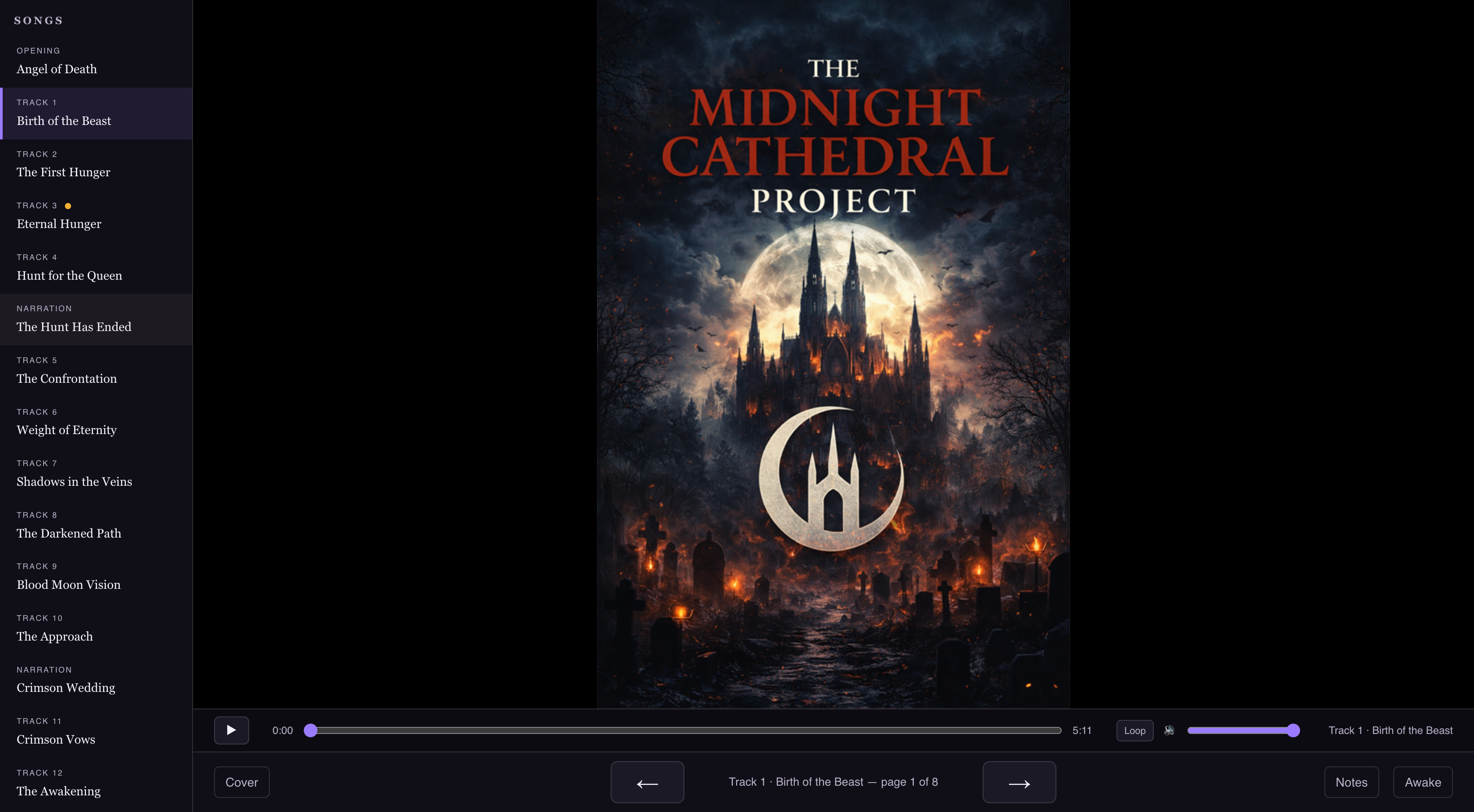
Other features soon came online: an “Awake” button that disables the laptop’s sleep function, a Notes function that is aware of the current song and lets me make notes on the fly as I’m rehearsing them (useful for when I need to go back into Kiro later and make a modification to the markup to update something on a page), a Cover button that effectively “closes” the songbook, so if I walk away from my rig, I can keep my songsheets private, and what appears on the screen is the cover art, which I copied from the Midnight Cathedral web site. The Notes function is interesting in that if I add a note on a song, the Notes indicator lights up, showing that song has some notes I need to address, and it persistently stays lit up until I clear out the note – for instance, after I’ve gone back in and made the change I needed to make to the markup.
I also added a small amount of workflow automation around the application itself. A desktop launcher rebuilds the song pages and player, starts a local server, and opens the browser, so starting a rehearsal session does not require me to remember a series of technical steps. A file watcher can regenerate the pages shortly after I save a markup file, making the edit-and-review cycle much faster. I can make a note while rehearsing, return to the source markup to address it, and then refresh the player to see the result.
At some point, I’ll print out PDFs of these songs and create a physical version of this songbook to have on hand as a backup if anything ever goes wrong with the laptop or the app. (Because that’s one of my many hard-learned lessons over the years of gigging: things can always go wrong, so always have a Plan B) So another great feature I built in is the ability to style the resulting PDFs in a unique way: black and white only, optimized for print. When I get ready to do that, I know that I can easily export print-ready versions of the songs no matter how I style their HTML counterparts.
One very useful function of my songbook is the ability to play the MP3 of the song I’m working on, so there’s a Play button, with a slider to scrub through the song with a time indicator, as well as the ability to loop a section of song if I want to work on a particular passage on repeat. It’s extremely useful not only in my personal practice time, but also at rehearsals, if there’s a question about how the demo recording treats a certain section, it’s extremely handy for me to be able to play the song or the section on the spot right from my laptop.
The audio controls are part of the same rehearsal environment rather than a separate tool I have to manage. The player loads the matching MP3 as I move between songs, and its seek bar supports moving to a specific point in the recording. The A/B loop lets me set the beginning and end of a passage and repeat it while I work on a difficult transition or part. The local server was specifically configured to support audio seeking, so moving the playhead does not simply jump back to the beginning of the file.
So this became an exercise in not only becoming extremely familiar with a set of material I needed to learn, but also in developing a completely personalized tool designed specifically for how I like to work and perform.
Where It Stands
We are still in early days in learning and rehearsing this material as a band, and I hope to be performing this show in 2027. We’ll see. There is no feeling like being well prepared for a performance, and the older I get, the more clearly I understand what preparation I need to perform at my best. I intend to give this show my best, and AI-assisted development helps me do just that.
Impact at a Glance
What This Demonstrates
- Creating Clarity From Complexity
- Turning an hour of unfamiliar original material and an inconsistent set of notes into a single, standardized, easy-to-read system.
- Systems Thinking
- Designing a reusable markup language and pipeline — documents to text to HTML to PDF — so a change made once ripples across every song.
- AI-Assisted Development
- Using Kiro as a development partner to codify a process, build a browser-based app, and iterate on features quickly as new needs emerged.
- Information Design
- Color-coding chords, sections, cues, and keyboard assignments so the right information is visible at a glance during performance.
- Operational Excellence
- Building for the realities of live work — scrolling page views, setlist flexibility, print-ready backups, and a Plan B when things go wrong.
- Maker Mindset
- Building something completely customized for the way I like to work, and letting the act of creation be the teacher.